
KAMU ERP
A custom system that runs KAMU Group's stock, sales, delivery, purchasing and accounts in one place, in Arabic and English.
- Client
- KAMU Group
- Sector
- Wholesale & distribution
- Location
- Baghdad, Iraq
- Languages
- Arabic and English
- Year
- 2026
Walk through the real product.
These are real captures. Keep scrolling and the window moves to each part we point out.
- 1 / 6
The numbers that matter, first.
The dashboard opens on finalized invoices, invoice value and purchase expenses for any period, then the latest invoices, with a shortcut to start a new one.

- 2 / 6
One form for the whole sale.
Staff pick the warehouse, customer and district, then add products by search or barcode. Line discounts, delivery fees and the grand total are worked out further down the same form.
- 3 / 6
Shipments stay tied to invoices.
Transport invoices show each shipment's status beside its invoice, customer and distributor, and a sync button updates those statuses.
- 4 / 6
A stock count you can trust.
A stocktaking order names the warehouse, the date and the people counting, and it can hide the registered quantities from them while they count.
- 5 / 6
Everyone gets the access they need.
Roles are built action by action: viewing, creating, editing and deleting, area by area. An activity log then records what users do.
- 6 / 6
Seven reports, ready to export.
Sales, distributors, product profit, returns, warehouse movement, damage and purchases each have a report, filtered by period and exported to Excel or PDF.
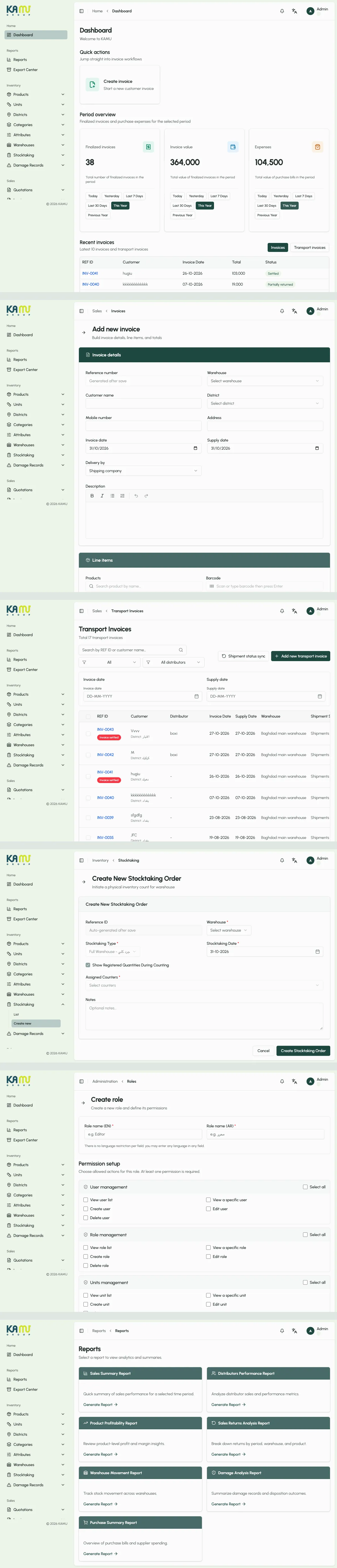
KAMU ERP is a custom system for KAMU Group. It brings stock, sales, delivery, purchasing, distributors and accounts into one application, with a full Arabic and English interface.
What we did
- Software Development
Background
The system is built around how the business runs: it holds stock in more than one warehouse, sells directly and through distributors, and delivers across Iraq's districts. Its products come in different sizes and colors, and can be sold as bundles.
The challenge
In a business like this, one sale touches several records. It takes stock out of a warehouse, adds a delivery fee for a district, may count toward a distributor's balance, and has to appear in the accounts and the reports.
When those records live in separate places, they drift apart. Stock counts stop matching, balances need checking by hand, and reports arrive late. Different people also need different access, from the staff counting a warehouse to the managers reading profit.
What we built
For stock, products have attributes and variations, and bundles have tiered prices by quantity. Stocktaking orders assign the people counting, and damage records keep the reason and the estimated loss.
For sales, quotations, invoices and transport invoices cover the path from the first offer to delivery, including barcode entry, printing, shipment status and returns. Each district has its own delivery fee.
For distributors and accounts, distributors get stock allocated to them and have their own balance. Users and distributors each have an account, and settlements are recorded against it.
For control, roles are set action by action and an activity log records what users do. Seven reports cover sales, profit, returns, stock movement, damage and purchases, and exports are kept together in an Export Center.
Related services.
Now scroll it yourself.
The same capture, free to scroll. Switch between desktop and phone.
Screens from a test environment with test data. Pages that show staff and account details are not included.